* written for a workshop at UiT
source code is available through git
git clone https://gilbu.dev/git/shell.git
What is a shell?
When we interact with our computer through a terminal we
are most of the time interacting with a shell. The shell is
a process just like any other, that follows a specific pattern of
behaviour.
- Read a command
- Evaluate the command
- Execute the command
- Present the output
- Repeat
this is more generally referred to as REPL (Read, Eval,
Print, Loop) and forms the basis for command processing. A shell can be
a systems-shell, like BASH is, but it can also be an interactive
environment for a specific programming-language, much like how Python
has its own interactive mode.
Builtins
Not every command we run is a program on our host system. Some
commands are referred to as builtins. a complete BNF-style grammar
exists at the end of this article to help highlight what our shell
should be able to do once we are done with our most basic
implementation. Two important builtins to consider are exit
and cd. the first allow the shell to termniate fully,
leaving the REPL iteration. the latter changes its relative location
within the system file tree. usefull for determining completion of
relative paths.
Chapter 15 of the advanced Bash Scripting Guide talks more about common builtins available in bash, many of these are also generally availble in other system shells. you can learn more here
A small sample has been provided in the attached repo for builtins
that accepts the keywords pwd and cd [name] to
print the current working directory, and change the current directory to
some provided path. if you are unfamiliar with file-tree hiearchies that
falls outside the scope of this article, but is very well explained
here.
How does execution work?
Most of the steps here are either simple or based on desired implementation, but for the sake of a systems shell, as we are interested in when building a “shell from scratch” there is a specific pattern of behaviour worth noting, as it is “required” almost regardless of implementation if we want to support the normally expected operations of file-redirection and piping.
When a shell wants to execute a foreign program, it first forks itself. (pun?) After forking the shell replaces one of the process instances with the requested executable. If that was completely Greek no worries!
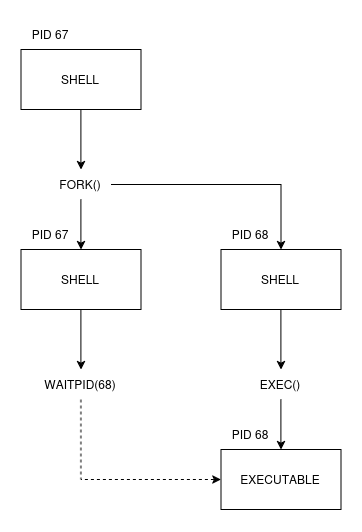
When a shell wants to do something, like list all the files in a
directory, we call a binary program on our system, often
ls, and the shell will then do a sequence of steps as
explained in the diagram above. first it forks or clones itself, then
one of the two instances replaces its own execution with the desired
binary, while the other process waits for the execution to
terminate.
This is a bit cumbersome, hopefully someone at the workshop can help explain this in more detail. the code is however quite simple. you can find it in the repository (link on top of page) as “simple.py” or some equivalent name, its about 10 lines of python.
IO?
when we run ls, it generates some output, that is it
writes stuff to stdout, we can of course allow our PTY/TTY (maybe in
another workshop we can go into more detail on terminals) to print
stdout as it does normally, but one of the many things we might want to
do is store the output of a program to a file. in bash and many other
shells this can be done with the > operand, usually,
> overwrites the target file with the stdout data. while
>> appends the output to the requested file.
ls ./ > results.txtin order for this to work we need redirection. Redirection is the process of capturing stdout from one application or process and feeding it into some target, here specifically we are looking at redirecting a programs output into a file. our diagram from before can be expanded partially to illustrate how this looks architecturally.
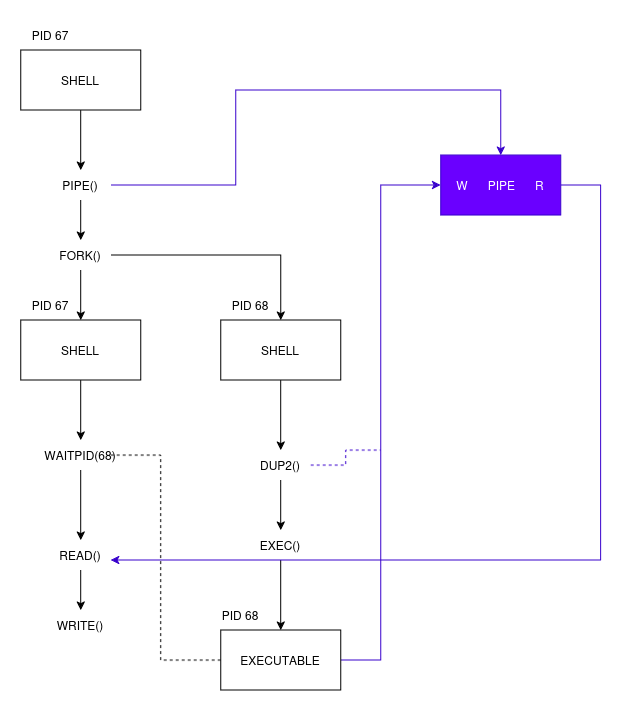
we start off by creating a pipe, a pipe is in this case some “file” with a file-descriptor for the “read” and “write” end. data can go “through” the pipe in order to corss interprocess borders. it varies from system to system but usually the pipe itself exists either in memmory or as a actual file on disk and is available to the system kernel.
once we have our pipe we can fork our process, similar to before. after forking but before execution one more step is performed, we call dup2 which duplicates or maps one file descriptor to another. in this case we are mapping or duplicating the write-end of our pipe to stdout on the process that is about to execute the requested command.
when the command execution is terminated, as in once we are done
awaiting the process id (waitpid()). we can read out all
the data from the read side of the pipe into the file we want to store
our results in!
for the oposite operation, that is < feed stdin from
file, we do a very simialr approach where we create a pipe, fill the
write-end with data from a specified file, and then after forking but
before execution dup the read-end of the pipe to stdin of our executed
command.
Pipes and chaining
The last segment of this workshop is chaining. sometimes we want
several programs to do things together. this is core to the heart of the
unix philosophy. many small programs that all manipulate data in some
way, and a unified method of transporting that data between programs.
usually text-files or streams are the common interface, LS
outputs text, GREP can accept text through stdin or read
text from files, curl can output responses as text, etc
etc.
since we have a unified “format” for communicating, IE text, we can
use chaining to feed the output of one program into the input of
another. for instance, if i want to list all python programs in
alphabetical order, i could start by listing all programs:
ls and then pipe the result into grep for
pattern matching. ls | grep py will show me all lines from
the output of ls that contain the sequence “py”. we can then sort those
lines by chaining in the sort prorgam, which reads data
from a file or stdin and then sorts each line.
ls | grep \.py | sort

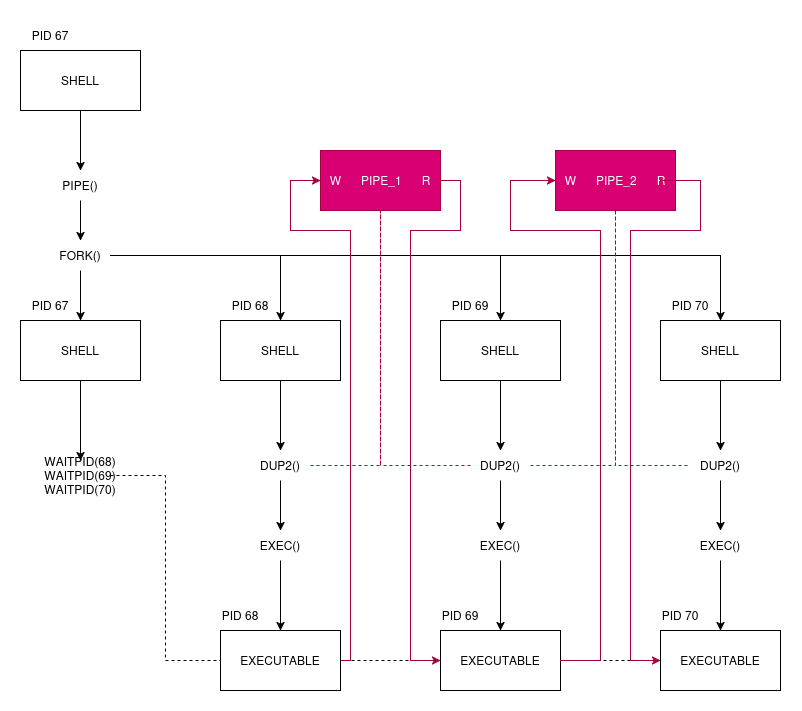
At this point it might become clear that there is “a lot” to handle at the same time. none of this is particularly difficult, but all of this is “complex” in the sense that there are a large amount of file-descriptors, process-relations and connections to manage at any givven time. and we must parse all these details out dynamically from a loosely defined command. after all we want the final experience of using our shell to be “aproachable” and “human friendly”.
chaining is a subject that might also be best suited for self-study, as it requires building a certain level of intuition around multi-process paradigms. an example of pipe-usage is availble in the repo.
Quests!
Two categories of tasks exist, the first aims at directing you towards building an actual shell, the other encourages you to ask questions and dig deeper in your own knowledge of how a computer system works.
- Create a simple REPL that simply echoes out whatever input it gets.
- Modify the REPL to try executing programs provided by the user, assuming they are real programs.
- Modify the REPL to support the
CDbuiltin - Modify the REPL to show the current working directory in its prompt
- Modify the REPL to support storing a programs stdout to a file
- Modify the REPL such that you can feed a file to stdin
(
prog arg1 arg2 < file) - Modify the REPL such that you can chain two programs together
- Modify the REPL such that we can chain an indefinete amount of programs together
- Modify the REPL to support conditional sequences
(
a && bonly runs b if a succeeds)
- Where does ls live on your system?
- is
pwda builtin? is it a binary? does it matter? - wait how does this work for cmd or powershell on windows?
- why is
bashthe de-facto standard for unix?
Did you do all that? great! enjoy your free pizza!